As an IT Business Analyst, you understand that great software requires crystal-clear specifications. In the world of microservices and integration, this means one thing: impeccable API documentation. While the OpenAPI Specification (Swagger) is the industry standard for defining a REST API, often the automatically generated output is dry, lacking in human context, and insufficient for true developer satisfaction.
This is where the analytical power of the Business Analyst meets the automation magic of Python. This article provides a clear, practical, and inspirational guide on eight advanced techniques to automatically enrich, validate, and convert your REST API documentation into a genuine asset for your developers, partners, and the entire organisation. We’ll use Python to bridge the gap between a raw API definition (the API definition) and a complete, trustworthy, and engaging documentation platform, transforming a simple endpoint into a valuable developer request tool.
For a broader look at this topic, you can also read our guide on how to improve automatically generated API documentation —specifically, our guide on OpenAPI: Improve Automatically Generated API Documentation.
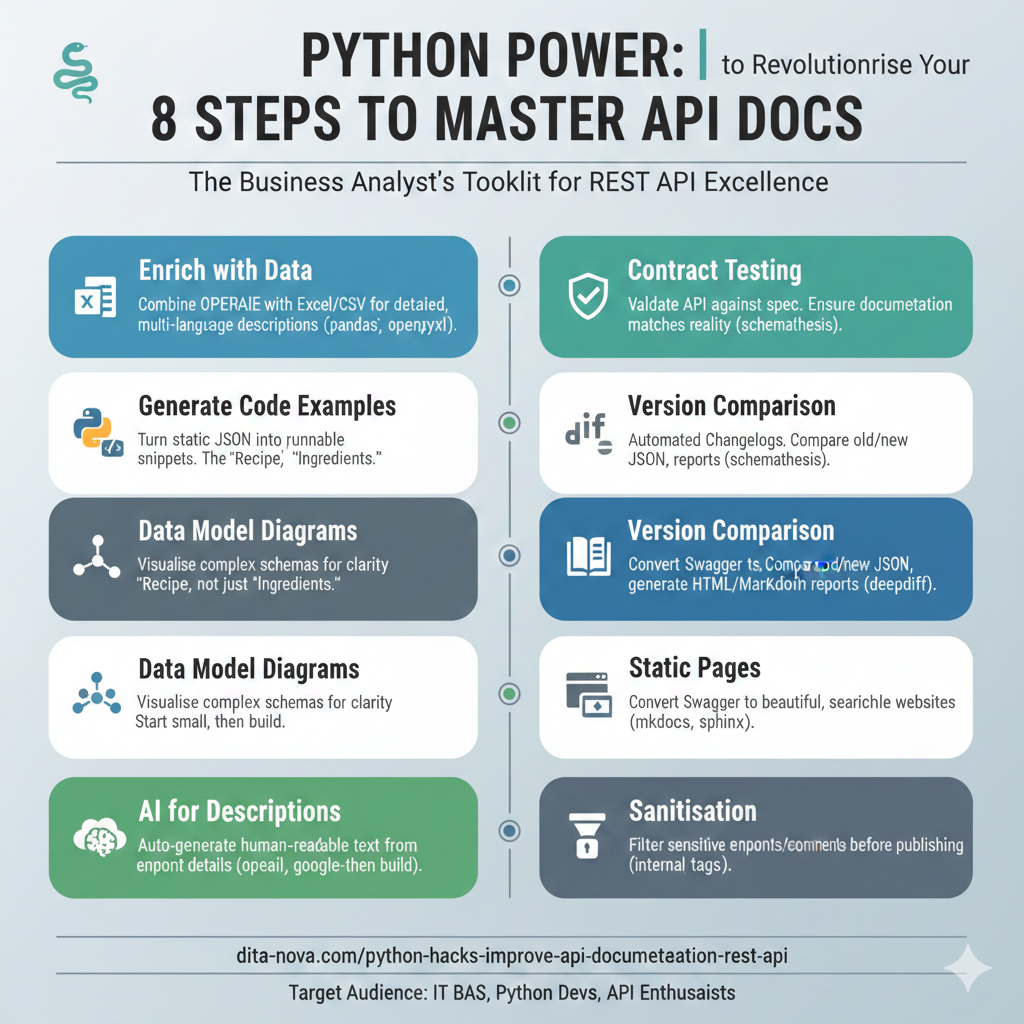
1. Enriching Documentation with External Data (Excel/CSV)
The core structure of your documentation—the endpoint paths, parameters, and schemas—is in your OpenAPI JSON/YAML file. However, your team often requires supplementary, human-readable information that doesn’t fit neatly into the specification, such as product-level summaries, multi-language descriptions, or internal notes.
The most practical approach is to manage this additional content in a structured spreadsheet (Excel is best for data entry, but converting to a standardised CSV is ideal for Python processing).
The Enrichment Strategy
The key is to create an Excel file that acts as an “enrichment layer.” This file must contain a unique key to map its data back to the OpenAPI specification. The best key for this purpose is the operationId.
- Excel/CSV Structure: Include columns for
operationId,summary_en,summary_cz,description_en,description_cz, and anyPoznámka(internal notes). - Crucial Note: The
operationIdin your Excel/CSV must precisely match the value in your Swagger file (e.g.,CreateAdvisor, notcreateAdvisor).
A Python script can then load both your OpenAPI JSON and your CSV. It iterates through the API’s paths, finds a match using the operationId, and then overwrites or populates the summary and description fields in the JSON with the data from the CSV. This allows product owners or technical writers, who may not be comfortable editing JSON/YAML, to maintain the descriptive text.
Required Libraries: You’ll need pandas for handling the Excel/CSV and openpyxl (a dependency of pandas for Excel files). Install them with: pip install pandas openpyxl.
2. Automating Example Generation: Data vs. Code
One of the most frustrating tasks for a developer consuming a REST API is translating the static Swagger Example Value into runnable code. This is the difference between “Ingredients” and a “Recipe,” and it’s a critical point in API documentation example best practice.
- Swagger Example Value (The Data/Ingredients): This is the raw JSON structure. The developer sees the data structure but must perform several steps to use it: open an editor, write
import requests, copy the endpoint URL, figure out mandatory headers, copy the JSON body, and determine the correct HTTP method (POST/PUT). - Your Python Snippet (The Code/Recipe): This is a complete, runnable code block—a “hot recipe.” The developer can simply use CTRL+C, CTRL+V and execute it.
The “Wow Effect”: By automatically generating a simple Python snippet that includes the correct URL, headers, and method based on the OpenAPI file, you save the developer those five minutes of setup work. This small effort yields a significant “wow effect” and boosts developer experience. A Python script can read the OpenAPI file, extract the necessary method, path, and schema, and format it into a code block ready for inclusion in the documentation.
3. Generating Data Model Diagrams for Complex APIs
For more complex API specifications, a purely textual description of the data schema (what you get from most generators) is difficult to follow. A visual representation of the data model is essential.
You can use Python to parse the OpenAPI schema definitions and generate a graph of how the different objects (schemas) relate to each other.
- Step-by-Step Approach: This is not a “fire and forget” task. If the generated diagram doesn’t match expectations, start small. Generate the model for a single, simple schema first. Get the code working perfectly for this one case, and then build on top of that to incorporate the entire complex API structure.
- Visual Libraries: Libraries like
graphvizor commercial tools that integrate with Python can be used to convert the parsed schema relationships into visually clear diagrams (like UML class diagrams or flowcharts). Including these visual assets, as images, into the documentation significantly aids reader comprehension.
4. Leveraging AI for Automatic Human-Readable Descriptions
Many developers rush and leave the description fields in the OpenAPI spec empty or, at best, use cryptic entries like "getAdvisor". This is poor quality API documentation.
You can use the power of modern Large Language Models (LLMs) to automatically enrich these textual fields:
- Script Development: Write a Python script that iterates through every endpoint in your Swagger file where the
descriptionorsummaryis missing or is just theoperationId. - LLM Integration: For each endpoint, the script sends the endpoint’s name and its parameters (inputs/outputs) to an LLM like Gemini or OpenAI.
- Prompt Engineering: Ask the LLM to “Generate a concise, human-readable paragraph explaining what this service does, tailored for a non-technical business user.”
- Update Swagger: The script then takes the generated, understandable text and saves it back into the Swagger file.
Required Libraries: openai or google-generativeai.
This process transforms the documentation from a technical reference into a functional guide, improving the quality of the content by writing for people, not just algorithms.
5. Contract Testing with Schemathesis
Contract Testing is a next-level feature for ensuring your API documentation reflects reality—it’s “higher-level engineering.”
The popular Python tool Schemathesis can read your OpenAPI specification (the contract) and automatically generate thousands of test requests for your running API.
- Functionality: Schemathesis verifies two crucial things:
- The API does not return a server error (e.g., 500).
- The API response structure (the fields, data types, and required properties) exactly matches what is declared in your documentation.
- Outcome: If the documentation claims a field is an integer but the API returns a string, the test will fail. This ensures your published documentation is trustworthy.
Required Library: schemathesis.
This practice establishes crucial Trustworthiness—a core component of Google’s E-E-A-T guidelines—by proving the documentation is a reliable source of truth.
6. Version Comparison and Automated Changelogs (changeDiff)
When a new version of your API is released (e.g., v2.7), your clients need a clear, concise changelog. Manually comparing two large JSON/YAML files is prone to error and time-consuming.
A Python script can automate the creation of a difference report:
- Load Versions: The script loads the old version JSON and the new version JSON.
- Deep Comparison: Using a library like
deepdiff, the script performs a structural comparison. - Report Generation: It then generates a structured report (in HTML or Markdown format) detailing all changes:
- “Parameter X added to service Y.”
- “Type of field Z changed from string to integer.”
Required Library: deepdiff.
This capability is a massive quality-of-life improvement for client developers, ensuring transparent communication during version updates and significantly improving the overall developer experience.
7. Converting to Static Documentation Pages
While Swagger UI is excellent for testing and interactive exploration, a “book-like” static website is superior for reading and internal navigation.
Python has powerful tools that can consume your raw Swagger file and transform it into a professional, searchable, static website that mirrors the quality of documentation provided by companies like Stripe or Google:
- MkDocs: A fast, simple static site generator focused on project documentation. Paired with extensions like
mkdocstrings, it can read the specification and generate clean, attractive pages. - Sphinx: A more powerful, flexible documentation generator, heavily used in the Python community.
Required Libraries: mkdocs, mkdocstrings, sphinx.
This conversion provides an excellent balance: your API definition remains the single source of truth, and Python handles the automated publishing to a user-friendly format, complete with a clickable table of contents for better navigation.
8. Sanitisation and Anonymisation for Public Consumption
It’s common to have a single, internal-only Swagger file that contains sensitive information, such as:
- Internal-only endpoints (e.g.,
/admin/delete-database). - Internal-only comments or security notes.
Before publishing documentation for external partners or the public, this internal spec must be sanitised.
A Python script can act as a reliable filter, ensuring security and compliance:
- Tag-Based Filtering: The script can remove all endpoints marked with a specific tag (e.g.,
internal,security). - Field Removal: It can selectively remove sensitive headers, specific schemas, or internal-only comments before generating the final, public-facing documentation file.
This process ensures that your internal development remains unimpeded, while your public-facing documentation maintains a professional, secure, and minimal surface area.
Summary and Next Steps
The OpenAPI Specification provides the contract, but Python provides the muscle to turn that contract into world-class API documentation. By leveraging the power of libraries like pandas, deepdiff, and even generative AI, you can automate the repetitive, low-value work and focus on the analytical and business-critical aspects of your role. This commitment to structure, validation, and user experience is what separates basic compliance from truly helpful, production-ready documentation that developers will love.
Understanding OpenAPI Specification: https://dita-nova.com/understanding-openapi-specification-api-blueprint/